AI Screener
AI Screener is a MultiLaunchess market-analysis tool that combines charts, quotes, a density map, LLM signals, and Telegram alerts.
You can open Screener:
- on the website: multilaunchess.com/screener/;
- from Launcher: Trading → Screener.
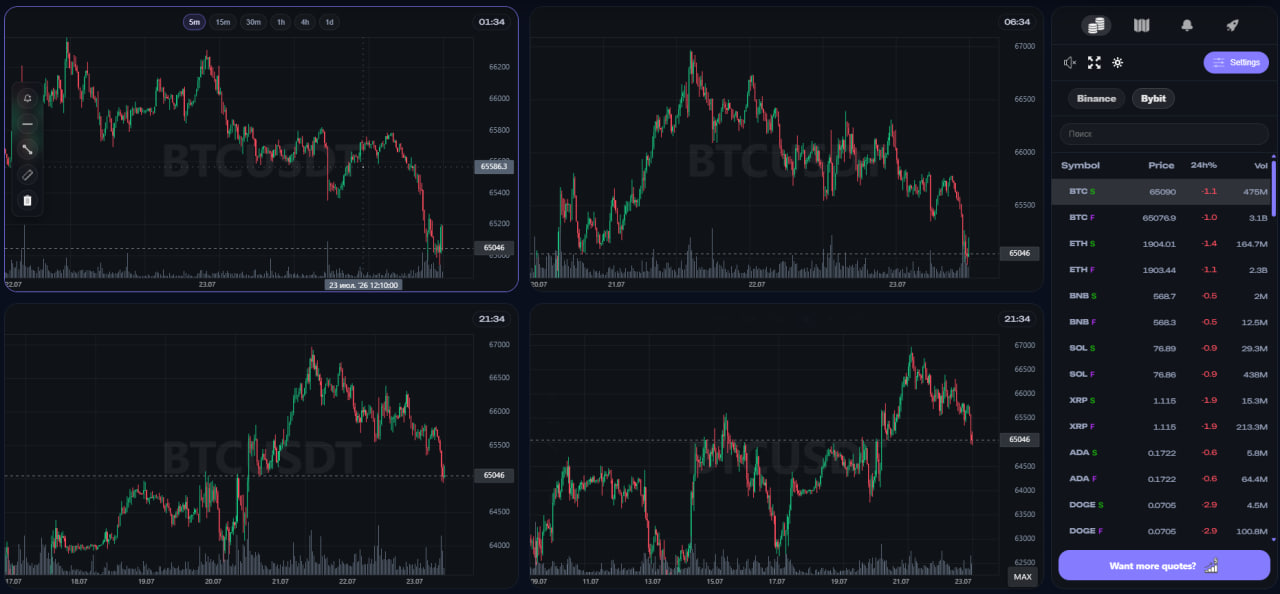
What is on the screen
The left side is the working area with charts. Depending on the selected grid, you can work with 1, 2, 4, or 6 charts.
The right side contains four tabs:
- Quotes;
- Density Map;
- Telegram alerts;
- Signals.
At the top of the right panel, quick actions are available for:
- signal sound;
- fullscreen mode;
- brightness;
- Settings.
Access by level
| Feature | Guest | Account without PRO | PRO |
|---|---|---|---|
| Charts at the same time | up to 2 | up to 4 | up to 6 |
| Quotes | 100 | 300 | 2000+ |
| Chart tools and markup | Yes | Yes | Yes |
| Binance / Bybit | Yes | Yes | Yes |
| Spot / Futures | Yes | Yes | Yes |
| Telegram alerts | No | Yes | Yes |
| LLM signals | No | 20 per day | Unlimited |
Guest mode can open Screener without registration. When an action requires an account or subscription, the interface shows the relevant restriction.
What to open next
- Quick start;
- Interface;
- Search and quotes;
- Chart;
- Exchanges and markets;
- Densities;
- Density map;
- LLM signals;
- Telegram alerts.
warning
AI Screener is an analytical tool. Signals, densities, and levels do not guarantee price movement or financial results.