Registration
On the MultiLaunchess website, Create account opens the Sign up form. Then confirm the email with the six-digit code from the message.
1. Open registration
Click Create account in the top navigation.
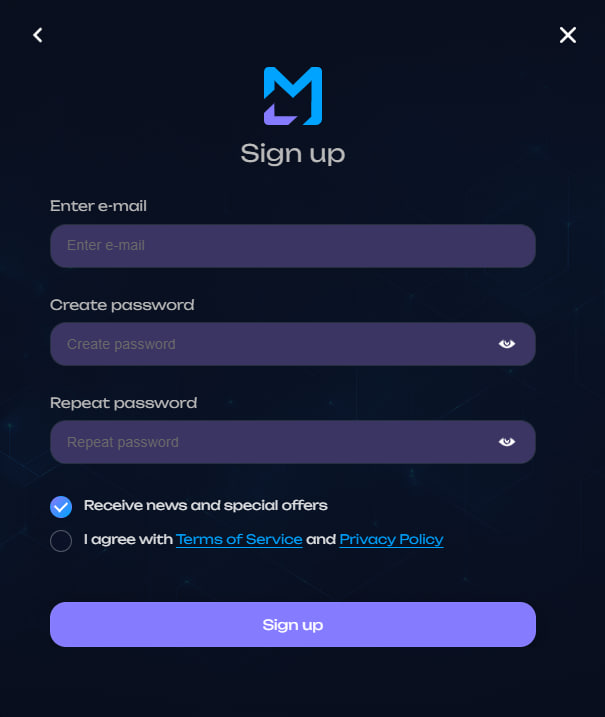
2. Enter your details
Fill in:
- Enter e-mail;
- Create password;
- Repeat password.
Registration is currently available only for gmail.com addresses.
Your password must meet all requirements:
| Requirement | Value |
|---|---|
| Length | 12–20 characters |
| Characters | Latin letters, digits, and symbols |
| Uppercase | at least one A–Z |
| Special character | at least one |
| Spaces and Cyrillic | not allowed |
Both password fields must match.
3. Accept the terms
Accept the User Agreement and Privacy Policy. Registration cannot continue without this confirmation.
News and offer emails are controlled by a separate checkbox and are not required.
Click Create account.
4. Confirm your email
The Email confirmation view opens after the form is accepted.
Enter the six-digit code and click Confirm email.
The code is valid for 15 minutes. A new code can be requested no more than once per minute and no more than five times per day.
Result
After successful confirmation, the web interface logs you in automatically and opens the account page.
If MultiLaunchess reports that the account already exists, log in or recover the password.